Home Assistant 2026.11 Matter cameras setup trap exposed
Key Takeaways
- Home Assistant 2026.11 Matter cameras setup adds camera support, but not every camera behaves the same.
- The trap: a camera can pair, show a tile, and still fail to show video.
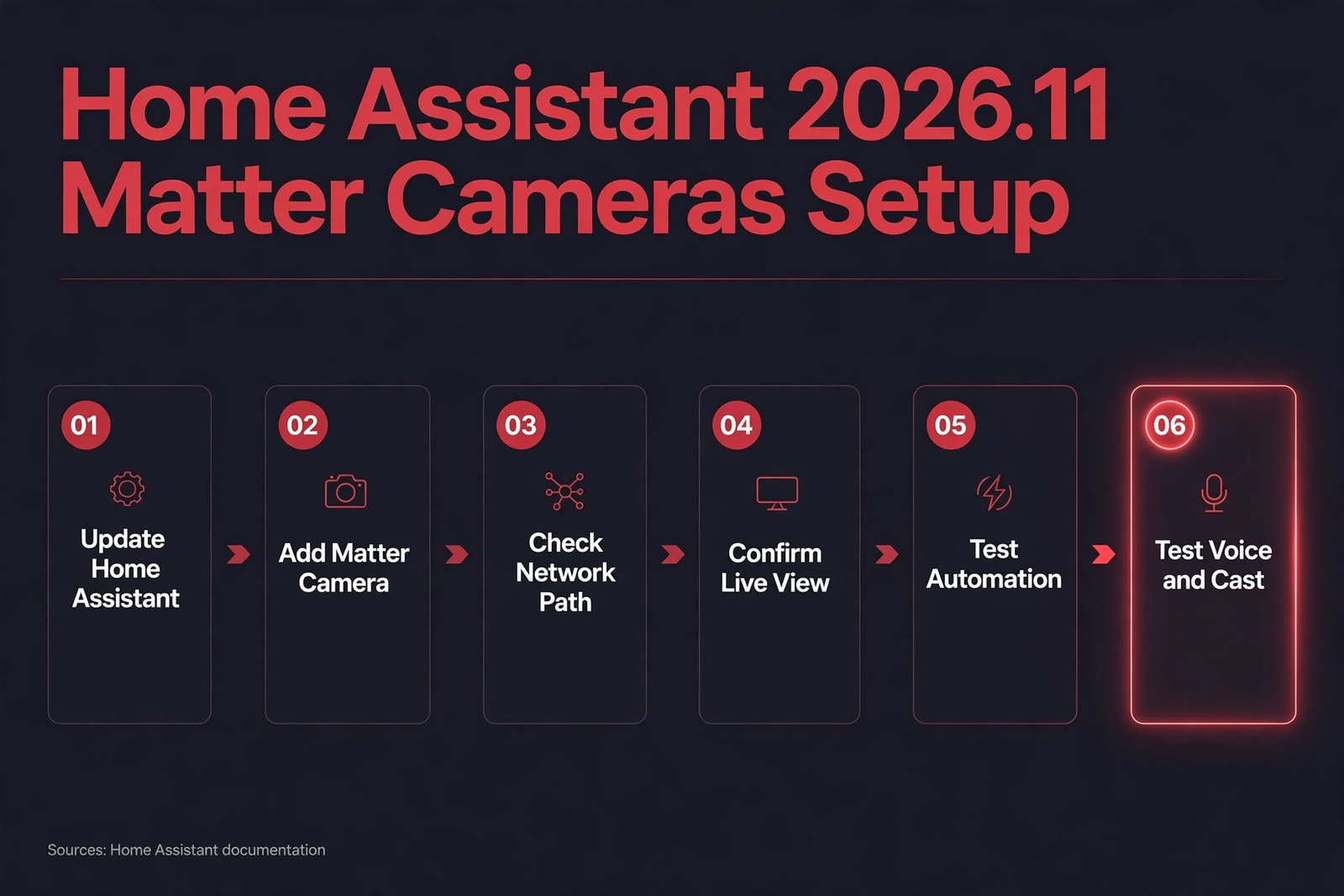
- Test in order: update, add, network path, live view, automation, voice and cast.
- Back up first. Do not update the night before a trip.
- IoT Insights Hub rule: one working camera beats five half-paired ones.
Home Assistant 2026.11
Home Assistant 2026.11 Matter cameras setup trap exposed
Home Assistant 2026.11 Matter cameras setup looks like a simple win. You update, you add the camera, you watch the feed. For some people, that is exactly what happens. For others, the camera pairs, the tile appears, and then nothing. No video. No automation. Just a grey box that pretends everything is fine.
Here is the thing: that grey box is not a broken camera. In most cases, it is a setup that stopped one step too early. Pairing is only the handshake. Video, automations, and voice control each need their own path to work.
This guide from IoT Insights Hub walks through what actually works, what breaks, and how to set it up in an order that catches the trap before you depend on the camera.
- What changes in Home Assistant 2026.11 for Matter cameras?
- How do I set up a Matter camera in Home Assistant 2026.11?
- Why does my Matter camera pair but show no video?
- Do Matter cameras need Thread or Wi-Fi?
- Why does my Matter camera keep going unavailable?
- What if my camera is on a separate VLAN?
- What do critics say about Matter cameras?
- Frequently asked questions
What changes in Home Assistant 2026.11 for Matter cameras?
Until now, many people ran cameras through a brand app, a separate integration, or a bridge. That worked, but it split the home in two. One place for lights and sensors, another place for cameras. This release pulls cameras closer to the rest of the home.
What is notable is how much that changes the daily feel. A camera in Home Assistant can feed an automation. A doorbell view can sit next to the lock. A motion event can turn on a light. That is the promise. The trap is assuming the promise lands for every camera on day one.
So treat Home Assistant 2026.11 Matter cameras setup as a door opening, not a finish line. Read the release notes for your exact model. Check whether your camera needs Wi-Fi, Thread, or a specific hub. Then test one camera before you move the rest.
How do I set up a Matter camera in Home Assistant 2026.11?
- Back up Home Assistant and your router config.
- Update to 2026.11 and restart.
- Add one Matter camera, not all of them.
- Check the network path: Wi-Fi signal, Thread border router, or VLAN path.
- Confirm live view in Home Assistant, not only the device tile.
- Test one automation, then one voice or cast check.
In Home Assistant 2026.11 Matter cameras setup, that order matters because each step tests a different path. Pairing tests discovery. Live view tests video. Automation tests events. Voice tests a third path. If you skip to the end and it fails, you will not know which path broke.
Give the first camera time. Watch the feed for a minute. Trigger the motion automation once. Then, and only then, add the next camera.
Why does my Matter camera pair but show no video?
This is the trap in the title. It feels like a bug. It looks like a bug. But in many homes, it is a path problem. Pairing uses one kind of traffic. Video uses another. One can pass while the other is blocked.
For Home Assistant 2026.11 Matter cameras setup, start with the simple checks. Is the camera actually powered and online in its own app? Is the Wi-Fi signal strong where the camera sits? Did it change network after pairing? A camera that moved to a guest network will not behave the same.
| What you see | What it often means | Check first |
|---|---|---|
| Tile appears, no video | Pairing passed, video blocked | Network path and firewall |
| Video works, then stops | Path drops after a change | Wi-Fi signal and network change |
| Video works in brand app only | Cloud path works, local path blocked | Local path to Home Assistant |
| Camera goes grey after reboot | Discovery or path lost | mDNS and border router |
Change one thing, test one camera, then move on. If you change five settings and test five cameras, you will not know which change helped.
Do Matter cameras need Thread or Wi-Fi?
In Home Assistant 2026.11 Matter cameras setup, this is where people waste the most time. They buy a Thread camera, put it on Wi-Fi, and wonder why it will not pair. Or they buy a Wi-Fi camera and hunt for a border router they do not need.
Check the box, the manual, and the product page. Look for the words Thread, Wi-Fi, and Matter. If the camera needs Thread, you need a border router in a good spot, with a clear path to Home Assistant. If it needs Wi-Fi, you need a strong signal and a clear path.
- Wi-Fi camera: check signal, band, and VLAN path.
- Thread camera: check border router placement and path.
- Either way: test pairing with one camera first.
If your home uses several protocols, read the IoT Insights Hub guide to multi-protocol IoT systems before you add more hubs.
Why does my Matter camera keep going unavailable?
In Home Assistant 2026.11 Matter cameras setup, intermittent failures are the hardest kind. The camera works in the morning. It fails at night. It works after a reboot. It fails after an update. That pattern points to a path that comes and goes, not a dead camera.
Look for the pattern. Does it fail after a router reboot? After a phone switches networks? After the camera moves to a different access point? A pattern is a clue. Write it down.
A quick triage list
- Power: is the camera on a stable supply, not a loose plug?
- Signal: is the Wi-Fi strong at the camera spot?
- Network: did the camera change network or address?
- Path: can Home Assistant still reach it after a reboot?
For a wider view on keeping devices safe while you test, read the IoT Insights Hub guide to securing your IoT network.
What if my camera is on a separate VLAN?
For Home Assistant 2026.11 Matter cameras setup, a VLAN is a good idea for cameras. A cheap camera should not be able to scan your laptops. But a VLAN also blocks the traffic that makes cameras easy to find. That trade-off is the whole story.
The fix is not to open everything. The fix is to allow the exact traffic Home Assistant needs, and block the rest. Discovery first, then video, then control. Test after each rule.
For the full move order, read Home Assistant 2026.11 Matter cameras setup on a VLAN — the IoT Insights Hub guide to VLAN setup that keeps Matter, Alexa, and Cast working.
What do critics say about Matter cameras?
Both sides have a point on Home Assistant 2026.11 Matter cameras setup. A brand app often has better clip history, better sharing, and better alerts. A standard camera in Home Assistant often has better automations and better privacy control. Neither wins on every front.
Critics also warn against buying on promise. Do not buy a camera because a press release says Matter. Buy it because your model, in your home, on your network, shows live view and triggers an automation. That is the only test that counts.
That said, the direction is clear. One standard, one place to control, fewer apps. IoT Insights Hub takes the middle path: test the standard, keep the brand app as a backup until the standard proves itself, and do not rip out a working setup for a headline.
For the business side of the same trade-off between open standards and vendor lock-in, see this related view on The Business Perspective.
For readers building a wider smart home, the IoT Insights Hub smart-home guide covers the trade-offs between comfort, cost, and security.
Frequently asked questions
Does Home Assistant 2026.11 support Matter cameras?
Home Assistant 2026.11 adds Matter camera support, but support does not mean every Matter camera works the same way. Check your camera model against the release notes, confirm the network path, and test live view before you rely on it for security or automations.
Why does my Matter camera show up but not show video in Home Assistant?
A camera can pair and still fail to show video when discovery works but the video path is blocked. Check the network path, the firewall rules, and whether the camera is on the same usable path as Home Assistant. Then retest live view, not only the device tile.
Do Matter cameras need Thread or Wi-Fi in Home Assistant 2026.11?
It depends on the camera model. Some Matter cameras use Wi-Fi, and some use Thread through a border router. Read the camera label and the release notes for your model. Do not assume a Thread camera will work on Wi-Fi, or the other way round.
How do I set up a Matter camera in Home Assistant 2026.11?
Update Home Assistant first, then add the Matter camera from the device flow, confirm the network path, and test live view. After that, test one automation and one voice or cast check. If any step fails, fix that step before moving to the next one.
Why does my Matter camera keep going unavailable in Home Assistant?
A camera often goes unavailable when it loses discovery, changes network, or the path to Home Assistant is blocked. Check the mDNS and firewall path, the camera power and Wi-Fi signal, and the Thread border router placement. Test after each change with one device.
Should I update to Home Assistant 2026.11 for Matter cameras?
Update if you have a Matter camera that the release supports and you have time to test. Do not update the night before a trip. Back up first, update, test one camera, then test automations. If your current setup is stable and you do not need cameras yet, waiting is fair.
Conclusion
A camera that pairs is not a camera that works in Home Assistant 2026.11 Matter cameras setup. A camera that shows live view, triggers an automation, and answers a voice check is a camera you can trust.
Do the boring parts first. Back up. Update. Add one camera. Test the video. Then repeat. That is how Home Assistant 2026.11 Matter cameras setup stays calm, and how you avoid the trap of a grey tile that looks fine and does nothing.
IoT Insights Hub will keep testing these setups as Matter and Home Assistant change, so check back before your next rebuild.
About The Author