Wi-Fi 8 Router for Smart Home: 19Gbps Trap Exposed
Key Takeaways
- Wi-Fi 8 router for smart home kits are shipping, with models quoted up to 19 Gbps combined speed.
- That number is a combined total across bands and clients, not the speed one phone will see.
- Most smart home gear still runs on older Wi-Fi or Thread, so it will not gain Wi-Fi 8 speed at once.
- Buy only if you have Wi-Fi 8 devices, a plan above 1 Gbps, or dead zones plus 30 or more devices.
- If two of those are not true, waiting saves money and avoids early-adopter pain.
Wi-Fi 8 Router for Smart Home: 19Gbps Trap Exposed
A Wi-Fi 8 router for smart home use sounds like an easy win. The box says 19 Gbps. The router looks fast. The store page says shipping now. So why do so many early buyers feel let down?
Here is the thing: the trap is not that Wi-Fi 8 is fake. The trap is that the headline number answers a question most homes are not asking. IoT Insights Hub looked at what is actually shipping, what it changes, and who gains from it. The short version is simple. Wi-Fi 8 is real, useful in the right home, and a waste of money in many others.
Should I buy a Wi-Fi 8 router for my smart home in 2026?
Most homes should wait. Buy a Wi-Fi 8 router for smart home use only if you own Wi-Fi 8 phones or laptops, pay for internet above 1 Gbps, or have dead zones and 30 or more devices. If two of those are not true, your current router is likely fine for now.
That sounds blunt. It is meant to be. A router upgrade is one of the easiest tech purchases to regret, because the gain is invisible when nothing else in the home can use it.
Think of it like buying a wider road when you still drive the same car at the same speed limit. The road is better. Your trip is not. The same logic applies here. Your internet plan, your devices, and your home layout set the limit, not the number on the router box.
That said, there is a group that should buy now. If your router drops calls, your cameras stutter, and your mesh nodes fight each other, a new system can help. Just buy it for coverage and stability, not for 19 Gbps.
What Wi-Fi 8 routers are actually shipping?
Wi-Fi 8 routers are shipping from 【entity-ASUS¦canonical_name=ASUS】 and TP-Link, with the first models aimed at gamers, large homes, and early adopters. 【entity-ASUS¦canonical_name=ASUS】 shipped the ROG Rapture GT-BN98 on October 6, 2026, and the ZenWiFi BN12 mesh system on October 20, 2026, per 【entity-ASUS¦canonical_name=ASUS】. TP-Link opened pre-orders for the Archer 8 Ultra in Germany on September 30, per retailer listings.
Those dates matter. This is no longer a trade-show demo. You can buy one. But early stock, early firmware, and early prices are part of the deal.
| Model | Type | What it is best for | Watch-out |
|---|---|---|---|
| 【entity-ASUS¦canonical_name=ASUS】 ROG Rapture GT-BN98 | Single router | Gaming, one strong central spot | One router cannot fix a large-home dead zone |
| 【entity-ASUS¦canonical_name=ASUS】 ZenWiFi BN12 | Mesh system | Large homes, mesh coverage | Mesh kits cost far more than one router |
| TP-Link Archer 8 Ultra | Single router | Strong central coverage, quoted up to 3,600 sq ft | Quoted coverage assumes open space, not thick walls |
For a deeper look at how smart homes are put together, see this guide from IoT Insights Hub on IoT in smart homes, benefits, security, and what comes next.
What does 19 Gbps really mean?
The 19 Gbps figure is a combined total across bands, streams, and clients, not the speed one device will reach. In real homes, internet plan speed, distance, walls, and device support set the result. Treat 19 Gbps as a ceiling for the whole system, not a promise for your phone.
Router makers add up the top speed of each band. That is how you get a huge number. It is not a lie, but it is easy to misread.
Here is a plainer way to see it:
- Your internet plan is the first limit. A 500 Mbps plan will not turn into 19 Gbps because the router is new.
- Distance is the second limit. Wi-Fi slows as you move away from the router, through walls and floors.
- Your device is the third limit. A phone with Wi-Fi 6 cannot use Wi-Fi 8 features, even on a Wi-Fi 8 router.
What Wi-Fi 8 does offer is steadier performance when many devices fight for airtime. That is less exciting than 19 Gbps, but far more useful. Cameras, video calls, and game streams care about stable latency, not a peak number that lasts a second.
That trade-off shows up in business coverage too. As The Business Perspective often frames hardware launches, the question is not how fast the headline is, but what buyers gain in daily use.
Who actually wins with Wi-Fi 8?
Three groups gain the most: homes with Wi-Fi 8 phones and laptops, homes with internet above 1 Gbps, and large or crowded homes with dead zones. If you sit in one of those groups, a Wi-Fi 8 router for smart home use can pay off. If you sit in none, the gain is small.
1. Homes with new Wi-Fi 8 clients
This is the clearest case. If your phone, laptop, or work machine supports Wi-Fi 8, you can use the new features. If none do, you are paying early for a future you do not yet own.
2. Homes with a fast plan
A plan above 1 Gbps is where a better router starts to matter. Below that, the plan, not the router, is the bottleneck. Check your bill before you check router specs.
3. Homes with dead zones and many devices
A mesh kit helps here, but only if you place nodes well. One router in a closet will not fix a three-floor home. Two or three nodes, placed high and in open spots, will do more than any spec sheet.
For security basics that matter with any new router, IoT Insights Hub has a practical guide to how to secure IoT devices on your network now.
Do I need Wi-Fi 8 for Matter devices?
No. Matter devices commonly use Thread or Wi-Fi, and many run on older Wi-Fi standards. A strong Wi-Fi 6 or 6E setup with a Thread border router covers most Matter homes without a Wi-Fi 8 upgrade.
This is where many buyers get confused. Matter is a smart home standard. Wi-Fi 8 is a radio standard. They work together, but one does not require the other.
Most Matter gear is low-bandwidth. A smart plug does not need gigabits. It needs a stable link, a clear setup path, and a border router that stays online. A new router can help with stability, but it is not a Matter requirement.
If your Matter setup is flaky, check these first:
- Is your Thread border router in a central spot?
- Are your 2.4 GHz and 5 GHz networks named in a way your devices can find?
- Is the router firmware up to date?
For a wider view of how 5G and Wi-Fi fit together in connected homes, see the IoT Insights Hub guide to 5G and IoT unlocking smart automation.
What do critics say about buying Wi-Fi 8 now?
Critics say early Wi-Fi 8 is a premium tax: few client devices, draft-era firmware, high prices, and a full standard that is not due until 2028. Supporters say early buyers get better mesh coordination and a longer-lived system. Both views hold some truth, so the right call depends on your home, not the hype.
The strongest criticism is simple. The full IEEE standard is not due until May 2028, per industry coverage of the draft spec. That means early routers use a draft. Draft hardware can still work well, but early firmware updates matter more than usual.
The second criticism is price. Retailer listings in Europe and North America have shown high early prices for mesh kits, often above the cost of a strong Wi-Fi 7 system. That gap will close, but early buyers pay it.
The fair counterpoint is that Wi-Fi 8 is built for crowded homes. If you work from home, run cameras, stream, and game at the same time, stability is worth money. The gain is not speed. It is fewer drops, fewer freezes, and fewer restarts.
Startups and product teams face the same trade-off. As Rise of Startups covers new hardware cycles, the lesson repeats: early adopters pay for learning, late buyers pay less for a calmer product.
How do I decide: buy now or wait?
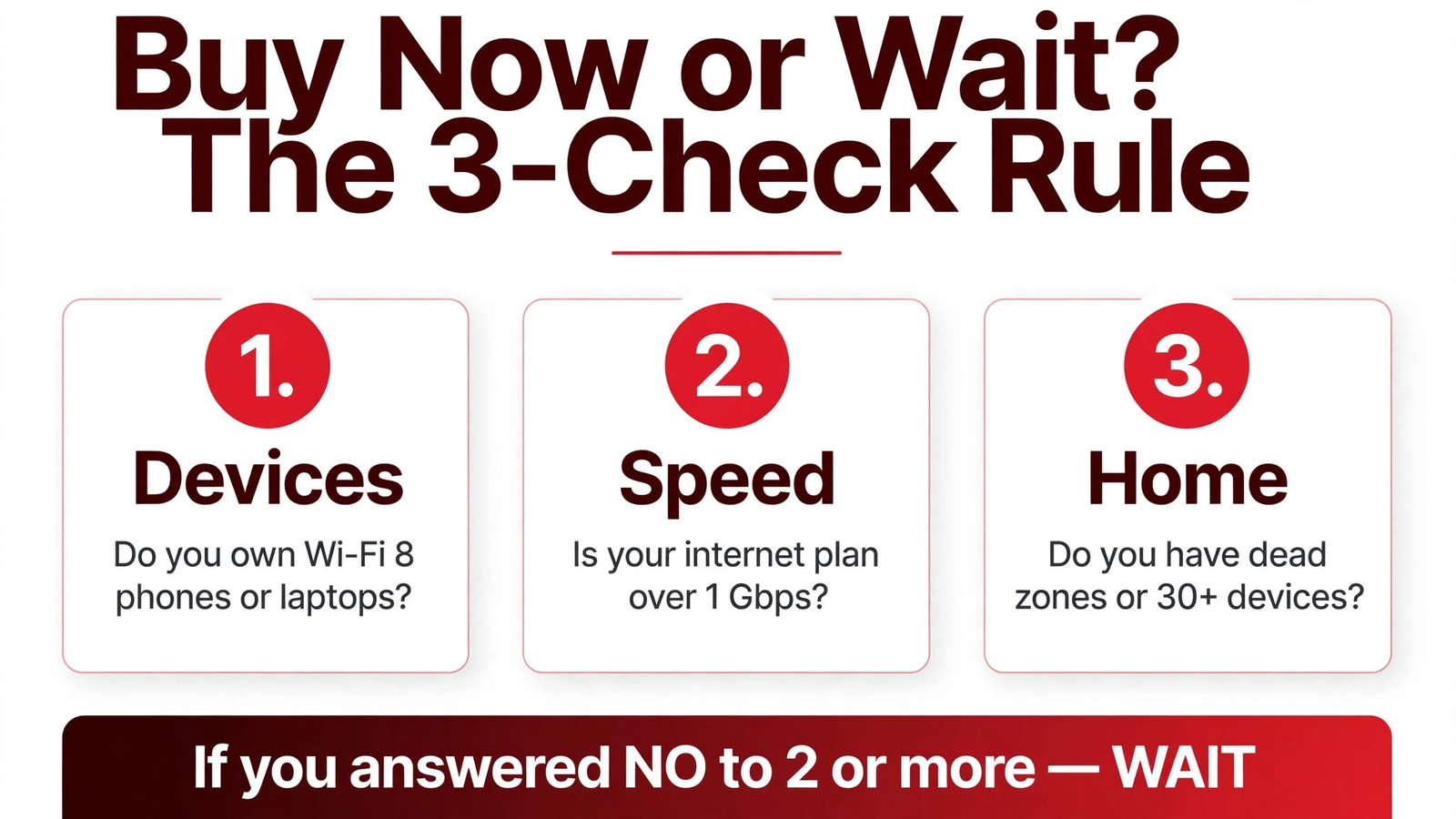
Run three checks: devices, speed, and home. If you answer yes to two or more, buying can make sense. If you answer no to two or more, wait. That rule keeps the decision tied to your home, not to a headline.
| Check | Buy now if | Wait if |
|---|---|---|
| Devices | You own Wi-Fi 8 phones or laptops | All devices are Wi-Fi 5 or 6 |
| Speed | Your plan is above 1 Gbps | Your plan is 500 Mbps or less |
| Home | You have dead zones or 30+ devices | One router already covers your home well |
If you do buy, keep these rules in mind:
- Buy mesh for a large home. One powerful router is not a mesh system.
- Place nodes high and central. A node in a closet helps no one.
- Update firmware on day one. Early Wi-Fi 8 firmware matters more than usual.
- Change default passwords. A new router is a good time to fix old security habits.
For home security context, IoT Insights Hub also covers home security IoT and how to protect your family now. And for connected-device messaging and alerts, see IoT Mail Bridge for how device notifications fit into a smart home setup.
FAQs
Should I buy a Wi-Fi 8 router for my smart home in 2026?
Most homes should wait. Buy only if you own Wi-Fi 8 phones or laptops, pay for internet above 1 Gbps, or have dead zones and 30 or more devices. If two of those are not true, your current router is likely fine for now.
Will Wi-Fi 8 make my smart home faster right away?
Not by itself. Most smart plugs, bulbs, cameras, and sensors use Wi-Fi 4, 5, or 6, or Matter over Thread. A Wi-Fi 8 router can improve crowded networks, but it cannot make older devices speak a newer standard.
What is the real benefit of Wi-Fi 8?
Wi-Fi 8 focuses on reliability in busy networks. It improves coordination between access points, use of channels, and steady performance when many devices compete. That matters more for video calls, cameras, and gaming than for headline speed.
Do I need Wi-Fi 8 for Matter devices?
No. Matter devices commonly use Thread or Wi-Fi, and many run on older Wi-Fi standards. A strong Wi-Fi 6 or 6E setup with a Thread border router covers most Matter homes without a Wi-Fi 8 upgrade.
Is Wi-Fi 8 worth it for a large home?
It can be, if dead zones are the real problem and you buy a mesh kit rather than one router. In a large home, placement and mesh coverage matter more than the Wi-Fi number on the box.
When should I upgrade to Wi-Fi 8?
Upgrade when your router is failing, your internet plan is above 1 Gbps, you own Wi-Fi 8 clients, or you are setting up a new mesh system. Otherwise, wait for wider device support and lower prices.
Conclusion
The 19 Gbps number did its job. It got your attention. It also set a false test for a product that wins on stability, not speed.
A Wi-Fi 8 router for smart home use is worth it when your devices, plan, and home can use it. It is not worth it when you are buying a number to feel future-proof. IoT Insights Hub will keep tracking prices, firmware, and device support, so you can buy when the gain is real, not just loud.
Before you spend, run the three checks. Devices. Speed. Home. If two say no, wait. That one pause is the whole point of this guide, and it will save more readers money than any spec sheet.
About The Author